Manual vs. Automated Watermark Removal: Pros, Cons, and Which Is Right for You?


When it comes to removing watermarks from images, you generally have two options: manual or automated removal.
Manual methods give you more control and precision, which is especially useful for high-resolution images. For example, manual techniques can achieve high PSNR (Peak Signal-to-Noise Ratio) and SSIM (Structural Similarity Index) values, often outperforming automated methods in terms of image quality. However, these methods can be time-consuming. On the other hand, automated watermark removal leverages AI technology to quickly process large batches of images or handle complex tiled watermarks, saving you significant time while maintaining good quality. Both methods have their own strengths, so understanding which one works best for your needs is key.
Key Takeaways
Removing watermarks by hand gives better accuracy and control. It works well for tricky designs. Use apps like Photoshop for great results.
Using automatic tools to remove watermarks is faster and easier. It’s great for fixing many pictures quickly. Try tools like WatermarkGONE to save time.
Think about how hard the watermark is, your time, and money. Pick manual tools for detailed work and automatic ones for speed.
What Is Manual Watermark Removal?
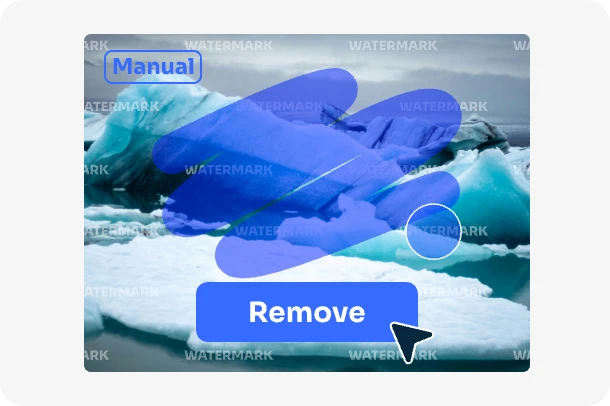
Definition and How It Works
Manual watermark removal involves using editing tools to erase or obscure watermarks from images or documents. This process requires you to carefully analyze the watermark's placement and design before applying specific techniques to remove it. Unlike automated methods, manual removal gives you complete control over the process, allowing for precise adjustments to maintain the quality of the image.
To remove a watermark manually, you typically use software like Photoshop, GIMP, or Paint.NET. These tools let you edit the image pixel by pixel, ensuring the watermark is removed without damaging the surrounding content. For documents, you can use built-in features in applications like Microsoft Word or Google Docs to delete watermarks directly.
Examples of Tools and Methods
Here are some common tools and methods used for manual watermark removal:
Image Editing Software: Programs like Adobe Photoshop and GIMP allow you to use tools such as the clone stamp, healing brush, or content-aware fill to remove watermarks from images.
Document Editing Applications: Built-in features in Microsoft Word, Excel, PowerPoint, and Google Docs let you delete watermarks from documents. For example:
Delete watermarks in Word by accessing the "Design" tab and selecting "Remove Watermark."
Use similar options in Excel and PowerPoint to eliminate watermarks.
Basic Tools: Paint.NET and similar free software provide simple tools for removing watermarks from less complex images.
Tip: Choose the right tool based on the complexity of the watermark and the quality of the image or document.
Pros of Manual Watermark Removal
Manual watermark removal offers several key advantages:
Precision and Control: You have full control over the process, allowing for detailed adjustments to ensure the watermark is removed without affecting the image's overall quality. PSNR (Peak Signal-to-Noise Ratio) and SSIM (Structural Similarity Index) metrics often show higher values for manually edited images, reflecting better quality.
Flexibility: Manual methods work well for both simple and complex watermarks, giving you the ability to tailor your approach based on the specific design, size, and placement of the watermark.
Professional Results: Using advanced tools like Photoshop, you can achieve seamless, high-quality results that look polished and professional.
User Satisfaction: Many users appreciate the intuitive nature of manual tools. Reviews often highlight the ease of use and the high-quality, professional look of the final product.
Metric | Description |
|---|---|
PSNR | Measures the quality of the restored image compared to the original. |
SSIM | Assesses the visual impact of changes in structural information. |
RMSE | Quantifies the difference between predicted and actual values. |
RMSEw | Calculates RMSE within the watermark mask area. |
F1-score | Evaluates the accuracy of predicted watermark masks. |
IoU | Measures the overlap between the predicted mask and the ground truth mask. |
Cons of Manual Watermark Removal
Despite its benefits, manual watermark removal does have some drawbacks:
Time-Consuming: The process can be slow, especially for complex designs or large batches of images, as manual edits require significant time and effort.
Skill Requirement: To effectively use advanced editing tools, you need a certain level of expertise. Beginners may find it difficult to achieve the same level of precision.
Limited Efficiency: Manual methods are not ideal for batch processing. Automated tools can handle large volumes of images much more quickly, making them a better choice for high-demand situations.
Cost: Professional software like Photoshop can be expensive, which may not be ideal for casual users or those working with a tight budget.
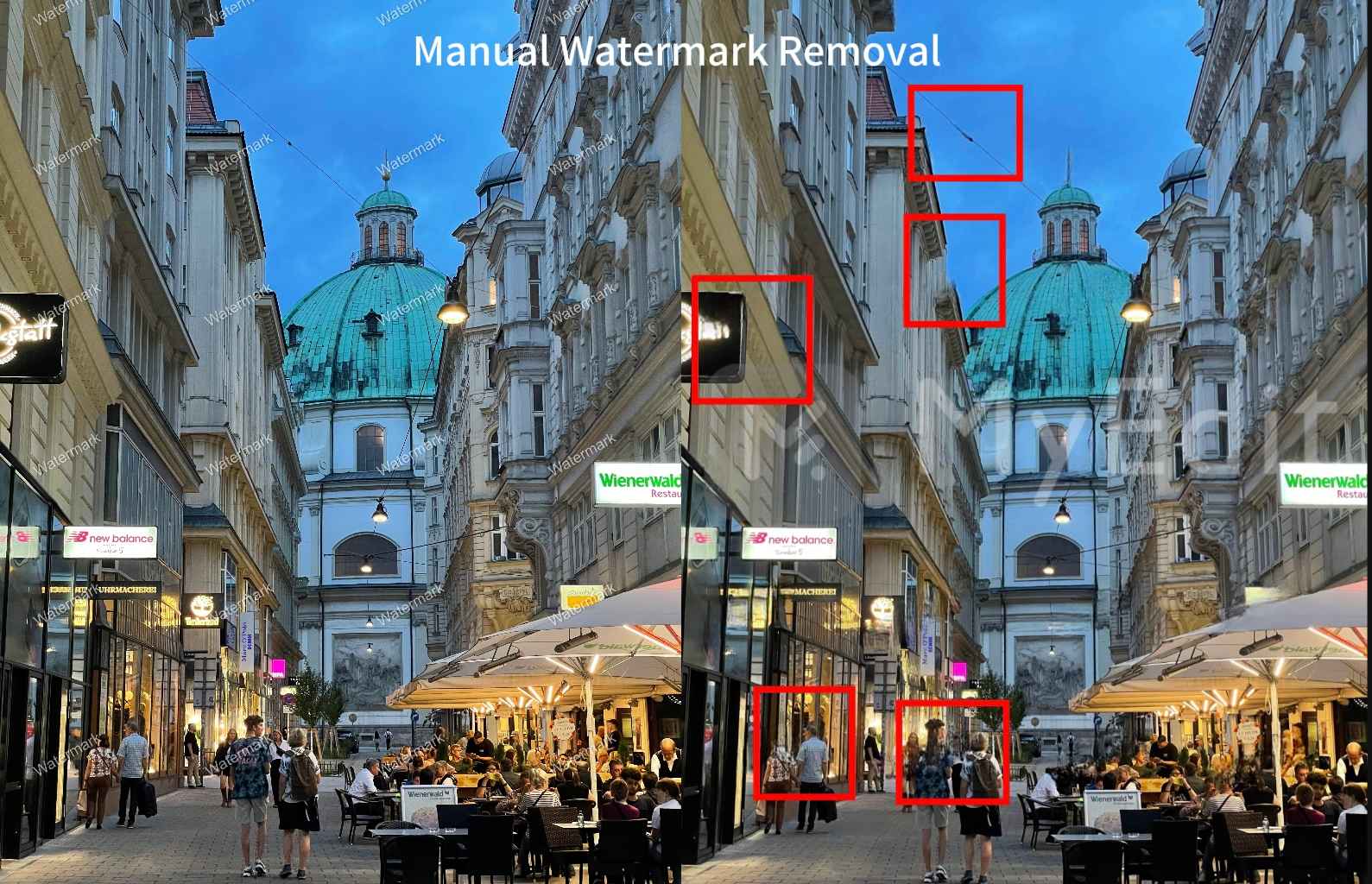
Risk of Background Distortion: When dealing with complex or tiled watermarks, manual removal can sometimes distort the image background, especially if the watermark overlaps intricate areas of the photo.
Note: If you're working on a tight deadline, or if you lack experience with image editing tools, automated watermark removal solutions may provide faster and more efficient results.
What Is Automated Watermark Removal?
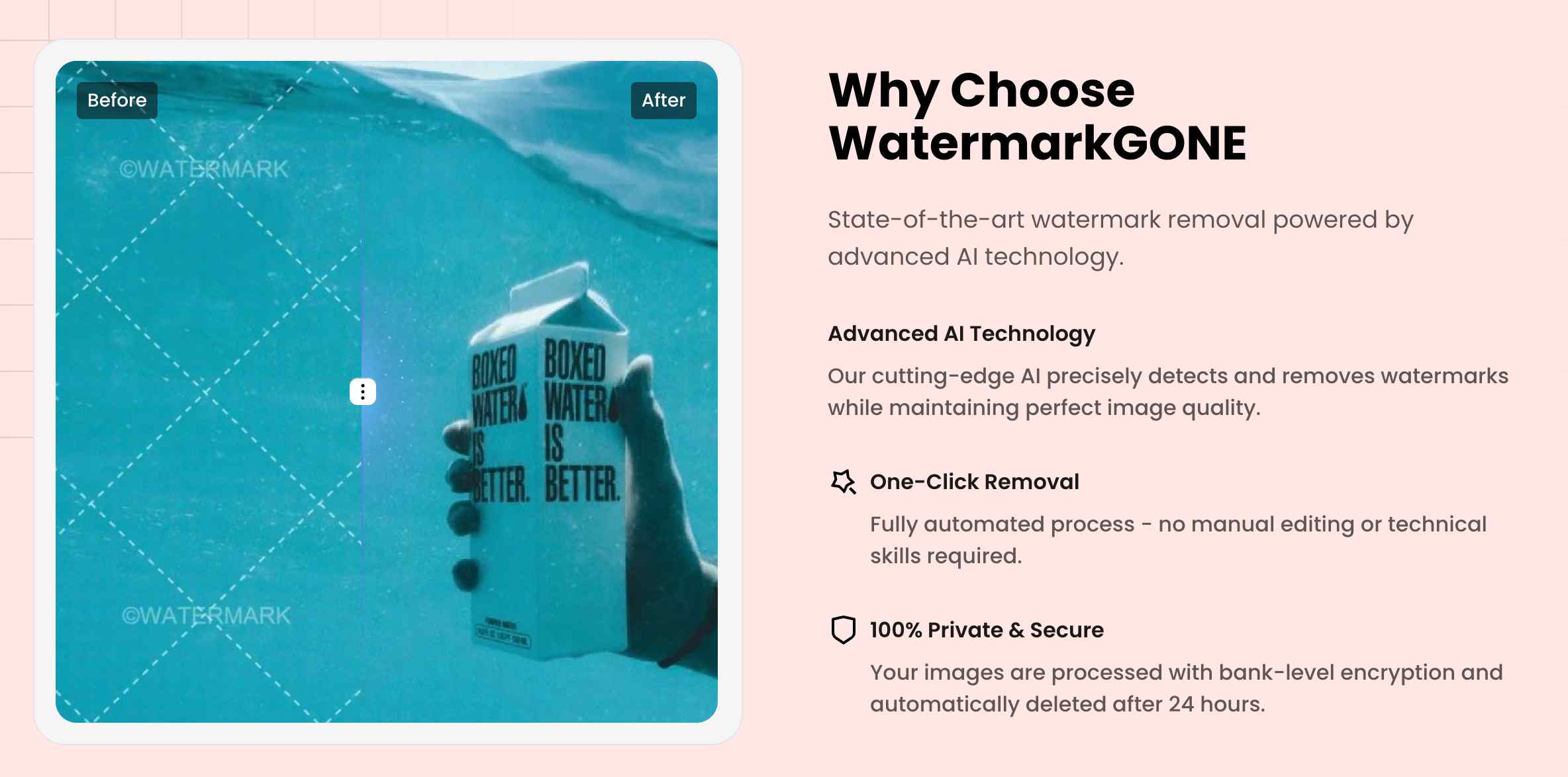
Image Source: WatermarkGONE
Definition and How It Works
Automated watermark removal uses advanced AI technology to detect and erase watermarks from images or videos. Unlike manual methods, this approach relies on algorithms to analyze the watermark's characteristics and determine the best way to remove it. The process is fast, efficient, and requires minimal input from you.
AI-powered watermark removal typically involves three key components:
Element | Description |
|---|---|
Artificial Intelligence (AI) | Analyzes the watermark to determine the best removal method based on its characteristics. |
User Interface (UI) | Displays information to users and accepts input, designed for ease of use and feedback. |
Back-end Processing | Executes the watermark removal by manipulating image data efficiently without disrupting other processes. |
These components work together to deliver a seamless experience. You simply upload your image, and the system handles the rest. This makes automated tools ideal for users who lack technical expertise or need to process large volumes of images quickly.
Examples of Tools and Software
Several automated watermark removal tools are available, each offering unique features. Here are some popular options:
WatermarkGONE: Quick and easy for both simple and tricky watermarks on uniform backgrounds.
Inpaint: Offers manual control for complex watermarks.
Hit Paw Watermark Remover: Ideal for complex backgrounds and watermarks.
Kapwing: User-friendly and efficient for straightforward tasks.
Among these, tools like WatermarkGONE stand out for their ability to handle both simple and complex watermarks with precision. WatermarkGONE also supports batch processing, making it a top choice for professionals and content creators.
Pros of Automated Watermark Removal
Automated watermark removal offers several advantages that make it a popular choice:
Speed and Efficiency: AI-powered tools can process images in seconds, saving you valuable time. This is especially useful for batch processing.
Ease of Use: Most tools feature intuitive interfaces, allowing anyone to remove watermarks without prior experience.
Consistency: Automated methods ensure uniform results across multiple images, reducing the risk of errors.
Advanced Features: Many tools use AI to preserve image quality while removing watermarks, even in complex scenarios.
Cost-Effectiveness: Free or affordable options exist, making automated tools accessible to a wide range of users.

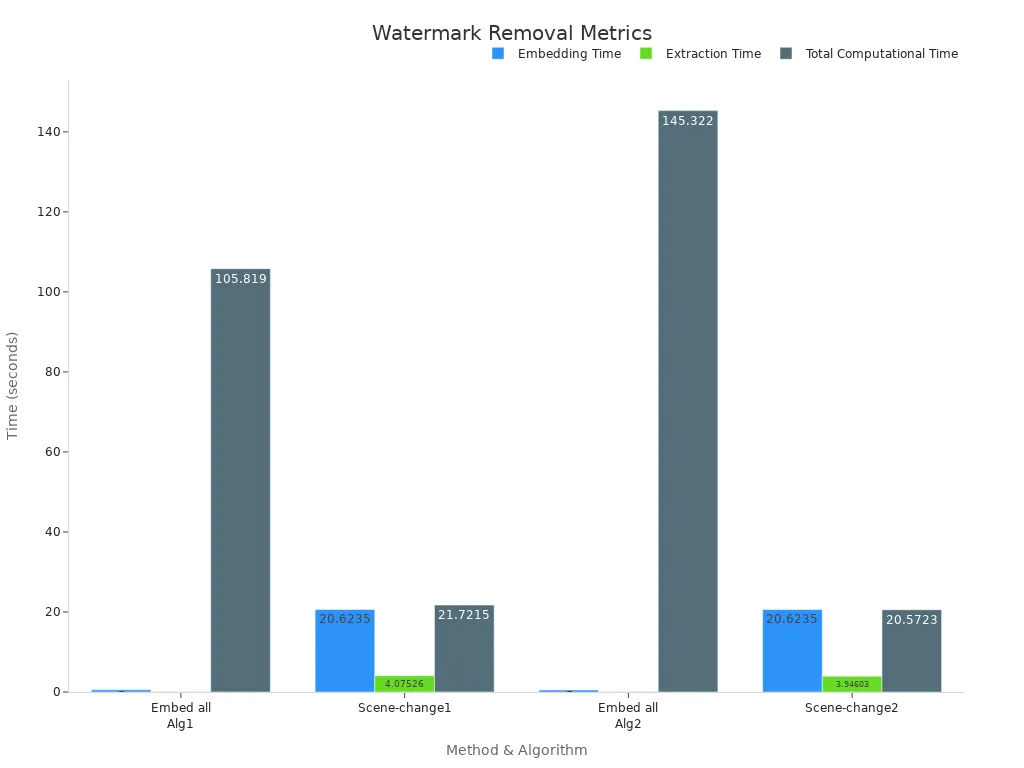
Performance metrics further highlight the efficiency of automated methods:
Method | Algorithm | Embedding Time (s) | Extraction Time (s) | Total Computational Time (s) |
|---|---|---|---|---|
Embedding in all frames | Algorithm 1 (LH subband) | 0.5514 | 0.12735 | 105.8190 |
Embedding in scene-changed frame | 20.6235 | 4.07526 | 21.7215 | |
Embedding in all frames | Algorithm 2 (LL subband) | 0.5195 | 0.123 | 145.3220 |
Embedding in scene-changed frame | 20.6235 | 3.94603 | 20.5723 |
Cons of Automated Watermark Removal
Despite its benefits, automated watermark removal has limitations. These include:
Accuracy Issues: Automated tools may struggle with highly complex watermarks or those embedded in intricate backgrounds.
Failure Under Specific Conditions: Studies show that automated methods can fail when the cropped area exceeds 50% of the video scale or when large-scale translations distort the watermark.
Dependence on AI Algorithms: The effectiveness of the removal process depends on the quality of the AI model used.
Limited Customization: Unlike manual removal, automated tools offer less control over the process, which may not suit users seeking precise adjustments.
Understanding these drawbacks can help you decide whether automated tools align with your needs. For tasks requiring high precision, manual methods might still be the better choice.
Key Factors to Consider When Choosing
Watermark Complexity
The complexity of a watermark plays a significant role in determining the best removal method. Simple watermarks, such as text overlays on uniform backgrounds, are easier to remove using automated tools. However, intricate watermarks embedded into detailed or textured backgrounds may require manual editing for precise results.
Digital watermarking techniques often fall into two categories: content-adaptive and content-agnostic. Content-agnostic watermarks, which embed fixed patterns regardless of the image content, are more vulnerable to removal techniques. Research shows that averaging multiple watermarked images can reveal the underlying pattern, making these watermarks easier to extract and remove.
If you frequently deal with intricate watermarks, manual methods may provide the control you need. For simpler designs, automated tools like WatermarkGONE can save you time while maintaining quality.
Image Quality
Image quality directly impacts the success of watermark removal. High-resolution images with minimal distortion allow both manual and automated methods to perform effectively. Conversely, low-quality images with pixelation or compression artifacts may complicate the process.
Studies reveal a strong correlation between the variance of adjacent pixels and the error introduced during watermark removal. Higher-quality images reduce this error, improving the effectiveness of both manual and automated techniques.
When working with high-quality images, automated tools can deliver excellent results. For low-quality images, manual editing may help you achieve better precision.
Time Constraints
Your available time is another critical factor. Manual watermark removal requires patience and skill, especially for complex designs. If you’re working on a tight deadline or need to process a large batch of images, automated tools are the better choice. Tools like WatermarkGONE can remove watermarks from multiple images in seconds, making them ideal for professionals and content creators.
Budget
Budget considerations often influence your choice of watermark removal tools. Manual methods may require expensive software like Photoshop, which can be costly for casual users. Automated tools, on the other hand, often offer affordable or even free options. WatermarkGONE provides a cost-effective solution with advanced features like batch processing and AI-powered precision.
User Expertise
Your level of expertise in content editing should guide your decision. Manual methods demand familiarity with advanced editing tools and techniques. Beginners may find these methods challenging and time-consuming. Automated tools, designed for ease of use, are more accessible to users with limited technical skills. With tools like WatermarkGONE, you can achieve professional results without prior experience.
Manual vs. Automated Watermark Removal: Which Is Right for You?
Detailed Comparison Table
Choosing between manual and automated watermark removal depends on your priorities. The table below highlights key differences to help you make an informed decision:
Aspect | Manual Watermark Removal | Automated Watermark Removal |
|---|---|---|
Ease of Use | Requires skill and familiarity with editing tools like Photoshop or GIMP. | User-friendly interfaces allow you to remove watermarks with minimal effort. |
Image Quality | Offers precise adjustments, but may struggle with intricate watermarks. | Maintains high quality for most images, especially large batch of images. |
Processing Speed | Time-intensive, especially for complex designs or large batches of images. | Processes images in seconds, ideal for batch removal and tight deadlines. |
Batch Processing | Not practical for handling multiple images simultaneously. | Supports batch processing, saving time for professionals and content creators. |
Automatic Detection | Relies on your expertise to identify and remove watermarks manually. | AI-powered tools automatically detect and remove watermarks with a single click. |
This detailed comparison highlights the strengths and limitations of each method. Automated tools like WatermarkGONE excel in speed and efficiency, while manual methods shine in precision and control.
Summary of Recommendations
Your choice between manual and automated watermark removal depends on your specific needs. If you prioritize precision and have the time and expertise to use advanced editing tools, manual removal is the way to go. It’s perfect for handling intricate watermarks, especially those embedded in complex backgrounds. However, keep in mind that manual tools can sometimes distort the background, particularly when dealing with overlay watermarks on text or complex patterns.
On the other hand, if you need to process multiple images quickly or lack the technical expertise, automated tools are your best option. Tools like WatermarkGONE combine AI-powered precision with batch processing capabilities, making them suitable for both professionals and beginners alike. These tools efficiently handle watermark removal without compromising the image quality.
For most users, automated watermark removal offers the perfect balance of speed, ease of use, and consistent results. Whether you’re a content creator, photographer, or marketer, automated tools streamline the process and deliver reliable outcomes. To determine the best approach for your needs, consider factors like time, budget, and expertise.
Choosing the right method for watermark removal depends on your needs. Manual tools give you control and precision for complex watermarks. Automated tools, like WatermarkGONE, save time and handle large-scale tasks efficiently. Evaluate your priorities—complexity, time, budget, and expertise—to select the best approach for your watermark removal tasks.
FAQ
What is the best tool for watermark removal?
The best tool depends on your needs. For quick and efficient results, automated tools like WatermarkGONE offer AI-powered precision and batch processing capabilities.
Can watermark removal damage image quality?
Automated tools preserve image quality during removal. However, manual methods may require extra care to avoid altering the original image's details.
Is it legal to remove a watermark from an image?
Removing a watermark without permission may violate copyright laws. Always ensure you have the right to edit or use the image.
See Also
Common Errors To Steer Clear Of When Erasing Watermarks
Ways To Eliminate Watermarks From Images Without Any Programs
Advice For Erasing Watermarks From Getty Stock Photos
Best Five Web Applications For Removing Watermarks In 2025
Comprehensive Guide To Eliminating Logos From Product Images

© 2024 WatermarkGONE • All rights reservedbuild with WatermarkGONE
